
Skip to content
The Smart DMS Knowledge Base
  • Home
  • Documentation
  • Encyclopedia
Contact Us
Contact Us
The Smart DMS Knowledge Base
  • Home
  • Documentation
  • Encyclopedia
Contact Us
Contact Us

Introduction

3
  • Overview of The Smart DMS
  • Getting Started with The Smart DMS
  • Understanding The Smart DMS Architecture

Common

33
  • Bookmarks
    • How To Add & Remove Bookmarks
  • Clients
    • How to Add a Client
  • Communication
    • Communication Overview
    • Settings
      • Communication Settings Overview
      • Email Settings
        • How to Configure Outgoing Email (SMTP) Settings
        • Email Templates
      • SMS Settings
        • SMS Shortcode & API Settings
        • SMS Message Templates
      • WhatsApp Settings
        • Official WhatsApp API Settings
        • WhatsApp Templates
    • Panel Banners
      • Panel Banners
    • WhatsApp
      • WhatsApp Overview
      • How to Setup a WhatsApp Web Session
      • How to Subscribe to System Updates in WhatsApp Groups
    • Web Push Subscribers
      • Web Push Subscribers Overview
  • Content Management
    • How To Add Content Such As FAQs & Guides
    • Content Management Overview in The Smart DMS
    • Categories
      • Managing Content Categories
    • Tags
      • Managing Content Tags
  • Logs
    • Tracking Actions: Understanding Logs in The Smart DMS
  • Notifications
    • How to Enable/Disable Notifications
  • Roles & Permissions
    • User Roles & Permissions Overview
    • Understanding Roles & Permissions Across Central and Tenant Panels
    • How To Create User Roles
  • Search
    • Using the Global Search Bar in The Smart DMS
  • Settings
    • Authentication
      • Authentication Settings
    • General
      • General Settings Overview
      • Do I Use Tenant-Specific or Central Settings
  • Users
    • How to Register a User
    • How To Update a User & Assign Roles
    • How To Bulk Assign User Roles
    • How To Update Your Profile
    • Biometrics
      • digitalPersona
        • How to Setup digitalPersona U.are.U 4500 Fingerprint Reader

Central

13
  • Main
    • Dashboard
    • Clients
      • Central Clients
    • Tasks
      • Central Tasks
    • Tenants
      • Tenant Overview — What Is a Tenant in The Smart DMS?
      • How To Create a Tenant
      • Updating a Tenant and Managing Assigned Users
      • Customizing Tenant Labels
    • Payroll
      • Payroll Overview
      • Commissions
      • How to View Your Account Balance
    • Policies
      • Managing Policy Categories
      • Managing Company Policies & Training Manuals in The Smart DMS
    • Subscription
      • How To Renew Your Smart DMS Subscription

Tenant

37
  • How To Access Different Tenants
  • Tenant Dashboard
  • Attendance
    • Attendances
    • Devices
      • Supported Biometric Devices
    • Settings
      • Attendance Settings
  • Ecommerce
    • Products
      • How To Create Simple Products
      • How to Create Cable Products in Bulk
      • How To Create Variable Products In Bulk
    • Requisitions
      • How To Request Store Items
      • How To Approve Requisition Items
      • How To View Inventory Used in a Task
  • Human Resource
    • Employees
      • How To Update Employees
    • Leave Management
      • How To Manage Leave Request Types
      • How Employees Can Request For Leave
      • How to Review a Leave Request
  • Marketing
    • Marketers
      • How to Create a Marketer
    • Commissions
      • Commissions Overview
      • Uncommissioned Tasks
  • Payroll
    • Advance
      • How Employees Can Request a Salary Advance
      • How To Approve A Salary Advance Request
    • Deductions
      • Employee Deductions
  • Tasks
    • Task Types
      • Task Types Overview
      • How To Create Task Types
    • Task Management
      • Task Statuses Overview
      • How To Create Tasks
      • How To View Unassigned Tasks
      • How To Start a Task
      • How To End a Task
      • How Employees Can Mark a Task as Bounced
      • How To Mark Tasks as Bounced in Bulk
      • How To View Inventory Used in a Task
      • How To Mark a Task as Complete / Done
    • Settings
      • Task Settings
  • Workflows
    • How To Approve Or Decline Transition Requests in Bulk
    • What are Workflows and Transitions?
    • How to Create a Workflow
    • How to Approve or Decline a Transition Request
  • Home
  • Documentation
  • Tenant
  • Human Resource
  • Leave Management
  • How To Manage Leave Request Types
View Categories

How To Manage Leave Request Types

< 1 min read

Before employees can submit leave requests, leave types must be defined in the system.
Leave types define the different categories of leave supported by your organization and the basic rules that apply to each type.

Go to: Human Resource → Leave Management → Leave Types

Creating a Leave Type #

Leave types allow you to structure and standardize how leave is requested, approved, and managed.

Common Leave Type Examples #

You can define leave types such as:

  • Annual Leave
  • Sick Leave
  • Maternity Leave
  • Paternity Leave
  • Compassionate Leave
  • Study Leave
  • Unpaid Leave

Leave Type Configuration #
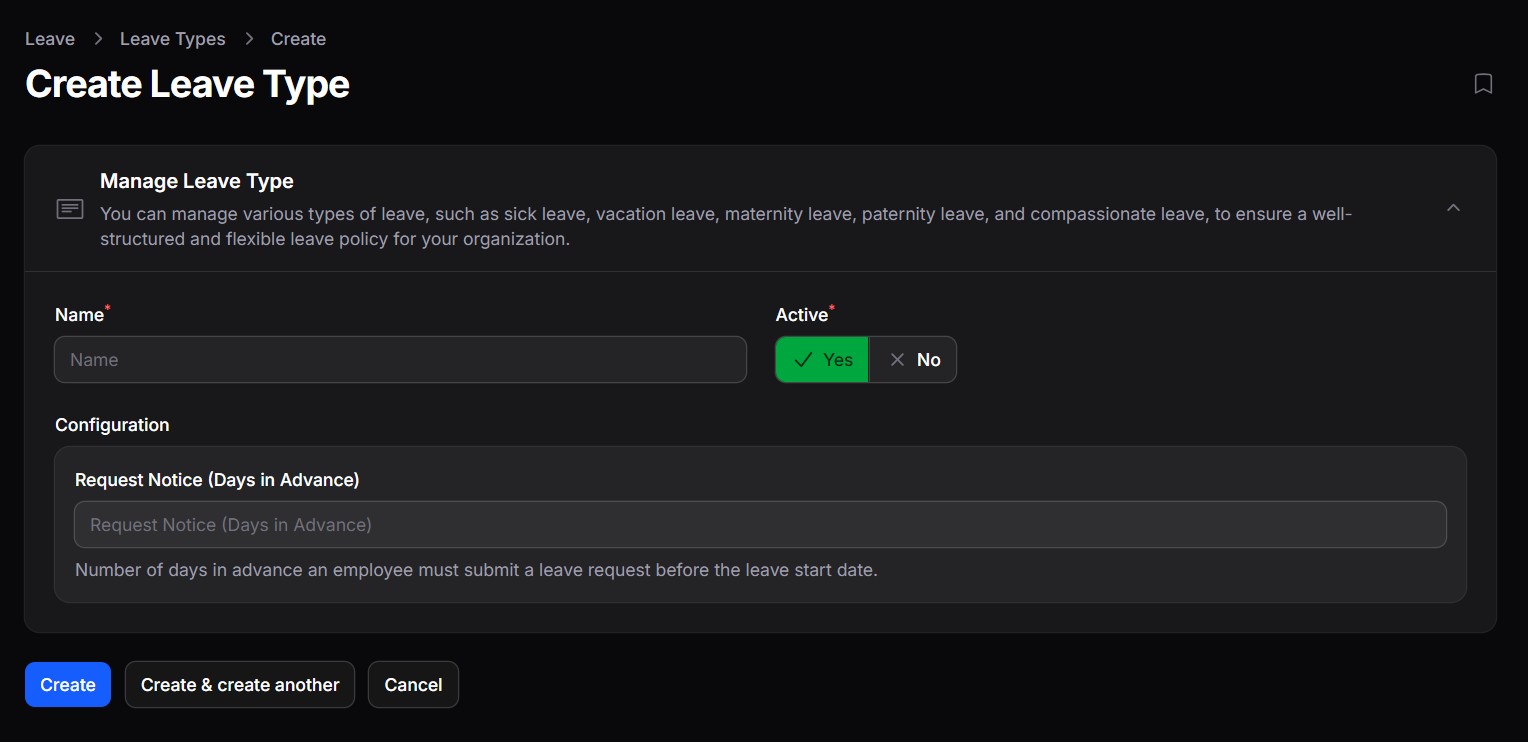
When creating or editing a leave type, the following settings are available:

  • Name
    The name of the leave type (e.g. Annual Leave, Sick Leave).
  • Active
    Controls whether the leave type is available for selection when employees submit leave requests.
    • Yes: Employees can request this leave type
    • No: Leave type is hidden and cannot be used
  • Request Notice (Days in Advance)
    Specifies how many days in advance an employee must submit a leave request before the leave start date.
    • Useful for enforcing planning policies (e.g. Annual Leave must be requested 7 days in advance)
    • Can be left empty if no advance notice is required

Share This Article :

  • Facebook
  • X
  • LinkedIn
  • Pinterest
Still stuck? How can we help?

How can we help?

How to Review a Leave RequestHow Employees Can Request For Leave
Table of Contents
  • Creating a Leave Type
    • Common Leave Type Examples
  • Leave Type Configuration

123 Fifth Avenue, New York, NY 12004, USA.
+1 123 456 78 90
[email protected]

Copyright © 2026 The Smart DMS Knowledge Base