
Skip to content
The Smart DMS Knowledge Base
  • Home
  • Documentation
  • Encyclopedia
Contact Us
Contact Us
The Smart DMS Knowledge Base
  • Home
  • Documentation
  • Encyclopedia
Contact Us
Contact Us

Introduction

3
  • Overview of The Smart DMS
  • Getting Started with The Smart DMS
  • Understanding The Smart DMS Architecture

Common

31
  • Bookmarks
    • How To Add & Remove Bookmarks
  • Communication
    • Communication Overview
    • Settings
      • Communication Settings Overview
      • Email Settings
        • How to Configure Outgoing Email (SMTP) Settings
        • Email Templates
      • SMS Settings
        • SMS Shortcode & API Settings
        • SMS Message Templates
      • WhatsApp Settings
        • Official WhatsApp API Settings
        • WhatsApp Templates
    • Panel Banners
      • Panel Banners
    • WhatsApp
      • WhatsApp Overview
      • How to Setup a WhatsApp Web Session
      • How to Subscribe to System Updates in WhatsApp Groups
    • Web Push Subscribers
      • Web Push Subscribers Overview
  • Content Management
    • How To Add Content Such As FAQs & Guides
    • Content Management Overview in The Smart DMS
    • Categories
      • Managing Content Categories
    • Tags
      • Managing Content Tags
  • Logs
    • Tracking Actions: Understanding Logs in The Smart DMS
  • Notifications
    • How to Enable/Disable Notifications
  • Roles & Permissions
    • User Roles & Permissions Overview
    • Understanding Roles & Permissions Across Central and Tenant Panels
    • How To Create User Roles
  • Search
    • Using the Global Search Bar in The Smart DMS
  • Settings
    • Authentication
      • Authentication Settings
    • General
      • General Settings Overview
      • Do I Use Tenant-Specific or Central Settings
  • Users
    • How to Register a User
    • How To Update a User & Assign Roles
    • How To Bulk Assign User Roles
    • How To Update Your Profile

Central

13
  • Main
    • Dashboard
    • Clients
      • Central Clients
    • Tasks
      • Central Tasks
    • Tenants
      • Tenant Overview — What Is a Tenant in The Smart DMS?
      • How To Create a Tenant
      • Updating a Tenant and Managing Assigned Users
      • Customizing Tenant Labels
    • Payroll
      • Payroll Overview
      • Commissions
      • How to View Your Account Balance
    • Policies
      • Managing Policy Categories
      • Managing Company Policies & Training Manuals in The Smart DMS
    • Subscription
      • How To Renew Your Smart DMS Subscription

Tenant

20
  • How To Access Different Tenants
  • Tenant Dashboard
  • Ecommerce
    • Products
      • How To Create Simple Products
      • How to Create Cable Products in Bulk
      • How To Create Variable Products In Bulk
    • Requisitions
      • How To Request Store Items
      • How To Approve Requisition Items
  • Tasks
    • Task Types
      • Task Types Overview
      • How To Create Task Types
    • Task Management
      • Task Statuses Overview
      • How To Create Tasks
      • How To View Unassigned Tasks
      • How To Mark a Task as Complete / Done
      • How To Start a Task
      • How To End a Task
    • Settings
      • Task Settings
  • Human Resource
    • Employees
      • How To Update Employees
  • Marketing
    • Marketers
      • How to Create a Marketer
    • Commissions
      • Commissions Overview
      • Uncommissioned Tasks
  • Home
  • Documentation
  • Tenant
  • Tasks
  • Task Types
  • How To Create Task Types
View Categories

How To Create Task Types

1 min read

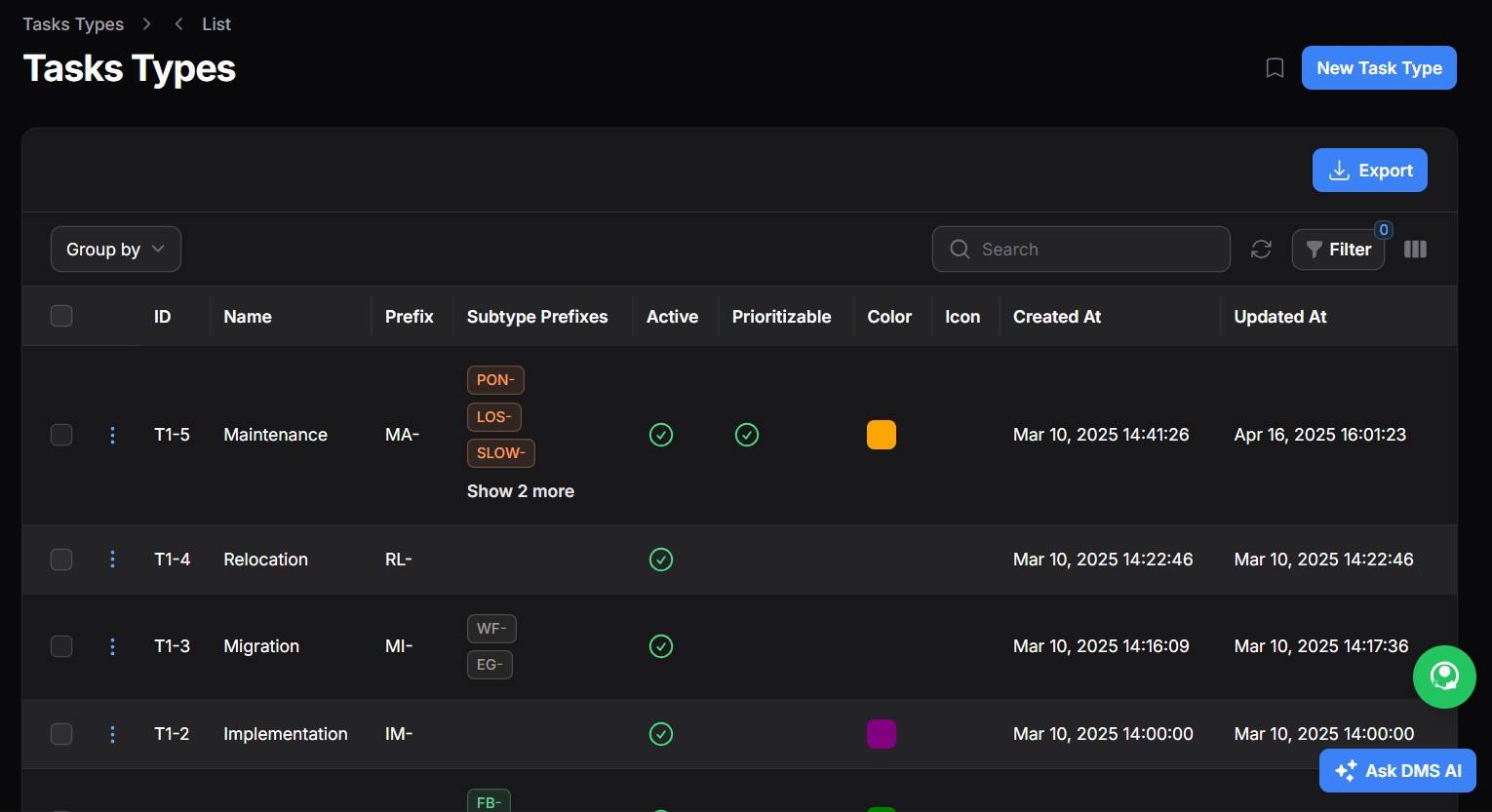
Task Types define the structure, rules, and logic of how specific categories of work are created, assigned, processed, and billed within the DMS. They ensure standardization, enable automation, and support auditability across the entire workflow — from task creation to remuneration, billing, and customer feedback.
1. Task Sub Types #

What They Are #

Task Sub Types are nested under a parent Task Type and allow further breakdown for clarity and operational control. For example:

  • Task Type: Internet Installation
  • Task Sub Types: Fibre, Wireless, Corporate Fibre, Site Survey, etc.

Key Fields: #

FieldPurpose
NameLabel shown to users (e.g., Fibre)
Task PrefixUsed to generate task reference numbers like IN-FB-0001
ActiveToggle to enable or disable this sub type
DescriptionRich-text field to explain this sub type
Color/IconOptional – used for UI identification
Eligibility SettingsToggle whether this task counts for remuneration (employee) or commission (marketer)

2. Remuneration & Commission Rules #

Employee Remuneration #

  • If enabled, the system allows defining how much a technician or staff member should earn upon completing a task under this type.

Marketer Commission #

  • If enabled, marketers receive a commission based on task performance or associated charges.
  • Recurring Commissions: You can define if commissions apply only on the first payment or recursively on each recurring invoice/payment.

Key Settings: #

OptionDescription
Eligible for RemunerationActivates earning logic for employees
Eligible for CommissionActivates earning logic for marketers
Is RecurringIf enabled, commission is paid on each client payment
Commission Pay DelaySet the payment number after which commission starts (e.g., after first payment)

3. Service Level Agreements (SLAs) #

SLA configuration ensures timely service delivery and proper prioritization based on urgency.

Priority Levels: #

  • Low Priority
  • Medium Priority
  • High Priority

Each priority defines: #

FieldDescription
Response TimeTime allowed from task creation to first staff action (e.g., 2 hours)
Resolution TimeMax allowed time to fully resolve the task (e.g., 24 hours)

Note: Use decimal values (e.g., 0.5) to represent 30 minutes.

4. Mandatory Charges #

Charges that must be added to tasks of this type — typically for client billing.

Example Charges: #

  • Package Fee (Unit: Mbps)
  • Router Fee (Unit: Units)
  • Site Survey Fee, Activation Fee, etc.

Charge Fields: #

FieldDescription
NameLabel (e.g., Router Fee)
Quantity UnitMeasurement unit (Mbps, Units, etc.)
ActiveToggle to enable or disable this charge
CommissionableShould a marketer earn from this charge?
DescriptionExplain the purpose or breakdown of the fee

💡 The actual amount is set when creating the individual task.

5. Feedback Questions #

Add structured questions that the client answers upon task completion. This improves service quality monitoring and customer satisfaction.

Examples: #

  • Is your internet working?
  • Are you satisfied with the cabling?
  • Any suggestions for improvement?
  • Do you understand the payment process?

You can add/delete/update questions for each Task Type.

6. Miscellaneous Settings #

General logic for task-type configuration such as:

  • Requisition requirement

7. Managing Multiple Sub Types #

Each Task Type can include multiple Sub Types. This is useful when:

  • You offer multiple versions of a service (e.g., Business vs. Residential)
  • Each sub type has different fees, SLA targets, or commission rules

Use the Add Sub Type button to register new variants under a Task Type.

Share This Article :

  • Facebook
  • X
  • LinkedIn
  • Pinterest
Still stuck? How can we help?

How can we help?

Task Types Overview
Table of Contents
  • 1. Task Sub Types
    • What They Are
    • Key Fields:
  • 2. Remuneration & Commission Rules
    • Employee Remuneration
    • Marketer Commission
    • Key Settings:
  • 3. Service Level Agreements (SLAs)
    • Priority Levels:
    • Each priority defines:
  • 4. Mandatory Charges
    • Example Charges:
    • Charge Fields:
  • 5. Feedback Questions
    • Examples:
  • 6. Miscellaneous Settings
  • 7. Managing Multiple Sub Types

123 Fifth Avenue, New York, NY 12004, USA.
+1 123 456 78 90
[email protected]

Copyright © 2025 The Smart DMS Knowledge Base